
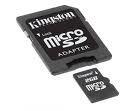
Solutions for Kingston Micro SD card Not Formatted
"My 4GB Kingston SD card with holiday pictures now has the message 'the drive is not formatted do you want to format it now?' whenever I insert it in the camera or computer card reader." - A user from a forum post.
How to recover the kingston sd card without formatting when memory card asks to format? Or can you recover deleted photos after formatting kingston memory card when receiving the format error message? How to recover corrupted Kingston micro SD card in RAW file system format?
Video - Fix Kingston sd card not formatted error
Also read: how to fix damaged sd card that is not formatting in android or pc
Solution1 - Recovering files from sd card with iCare Data Recovery Pro
iCare Data Recovery Pro is a fast effective software which can help us with different kinds of data lost problems. Not only can it restore sd card not formatted files, but can also restrieve files even you formatted the sd card.
Fast, easy to restore files back in just a second. Free download format recovery software now!
Steps to Recover Files from unformatted kingston micro sd card

Follow the tutorial to recover deleted videos from SD card kingston which has unformatted error:
Step1. Connect the Kingston micro SD card to your computer. Download and install the data recovery software. Launch the software and select a recovery module.
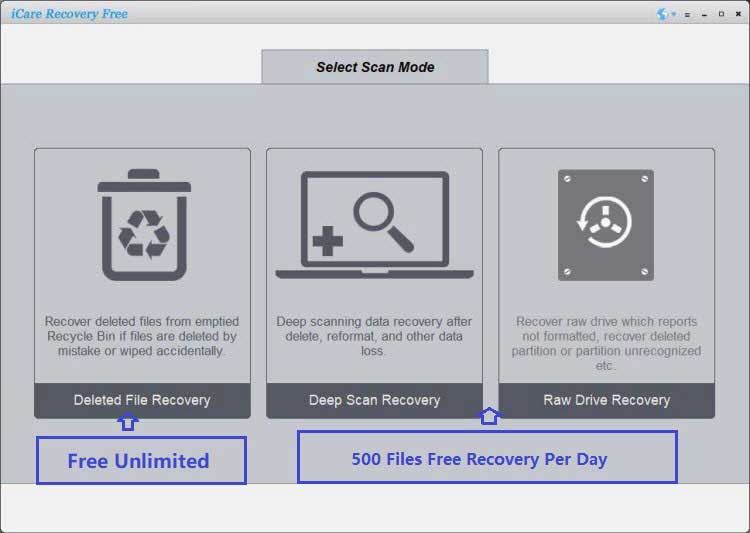
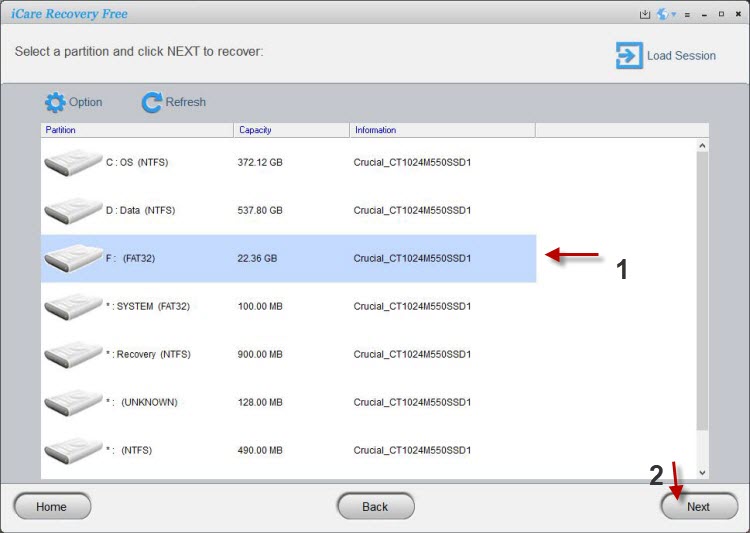
Step2. Choose the unformatted micro SD card and let the software scan it for lost files. You just need to wait when the software is scanning.
Step3. You can preview the files after scanning. Then, you can select the files you want to recover and save them.
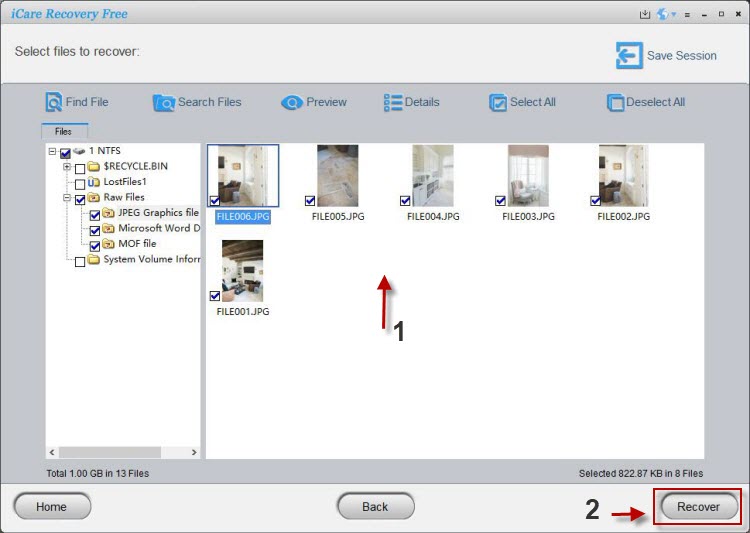
Notice: after you press Recovery, iCare Data Recovery will help you find all the data you lost, you should choose what is the information you really need.
Solution2: Kingston Micro SD Card Repair using cmd chkdsk
To repair a Kingston microSD card using the chkdsk command in Command Prompt (CMD), you can follow these steps:
- Insert the Kingston microSD card into your computer's card reader or use a USB card reader if your computer doesn't have a built-in card reader.
- Open Command Prompt on your computer. You can do this by pressing the Windows key, typing "cmd," and selecting the "Command Prompt" app.
- In the Command Prompt window, type the following command and press Enter:
chkdsk [drive letter]: /f
Replace "[drive letter]" with the actual drive letter assigned to your Kingston microSD card. For example, if the microSD card is assigned the drive letter "E," the command would be:
chkdsk E: /f
The chkdsk command will scan the microSD card for errors and attempt to fix them. It may take some time to complete the scan, depending on the size of the card and the number of errors encountered.
Once the scan is finished, Command Prompt will display a summary of the scan results. It will inform you if any errors were found and whether they were fixed.
If errors were found and fixed, you can try accessing the microSD card again to see if the issue has been resolved.
After the repair process, you can safely remove the microSD card from your computer.
Using the chkdsk command can help fix certain file system errors and restore functionality to the Kingston microSD card. However, please note that it may not be able to fix all types of physical damage or hardware issues. If the microSD card remains inaccessible or encounters recurring errors even after running chkdsk, it might be necessary to consider data recovery services or replace the card if it's under warranty.
Also read: 7 free memory card repair software
Along with Kingston Micro sd card not formatted error, it often can not be reconginized by computer and you probably can see nothing or the computer will say noting is in the port. How frustrating it might be to you while you have tons of beautfitul shots in the sd card. If memory card of camera is formatted, can you recover deleted files from micro SD card if you format it when receving not formatted error alert?
Fix Kingston MicroSD Card When It Reports Not Formatted Error
Kingston micro SD card is available in different capacity from 1GB to 128GB. You can use such kind of microSD card in digital device like mobile phone. In order to fix the not formatted error for Kingston micro SD card, the best way is to format it after recovering all files.
==>> If Kingston micro SD card won't format on any device, please refer to this article - Windows was unable to format memory card>>
Last updated on Sept 10, 2024
Related Articles
- Micro sd card raw wants to format
- Micro sd card for phone is raw
- Data recovery from raw microsd card
Other Articles
- SD card has not formatted error - Fix not formatted solution for SD card without touching the original data stored on it.
- SanDisk micro SD card access denied - Why does a SanDisk micro SD card is not accessible on your device? Is there any way to access it without formatting?